


Summa GoSign Pro Software Pack 395-995:
The software GoSign that comes with the machines includes plentiful useful features to get you going and will expand further in the future. The optional Pro pack offers even more functionality for those businesses wanting to maximise the use of their cutter.
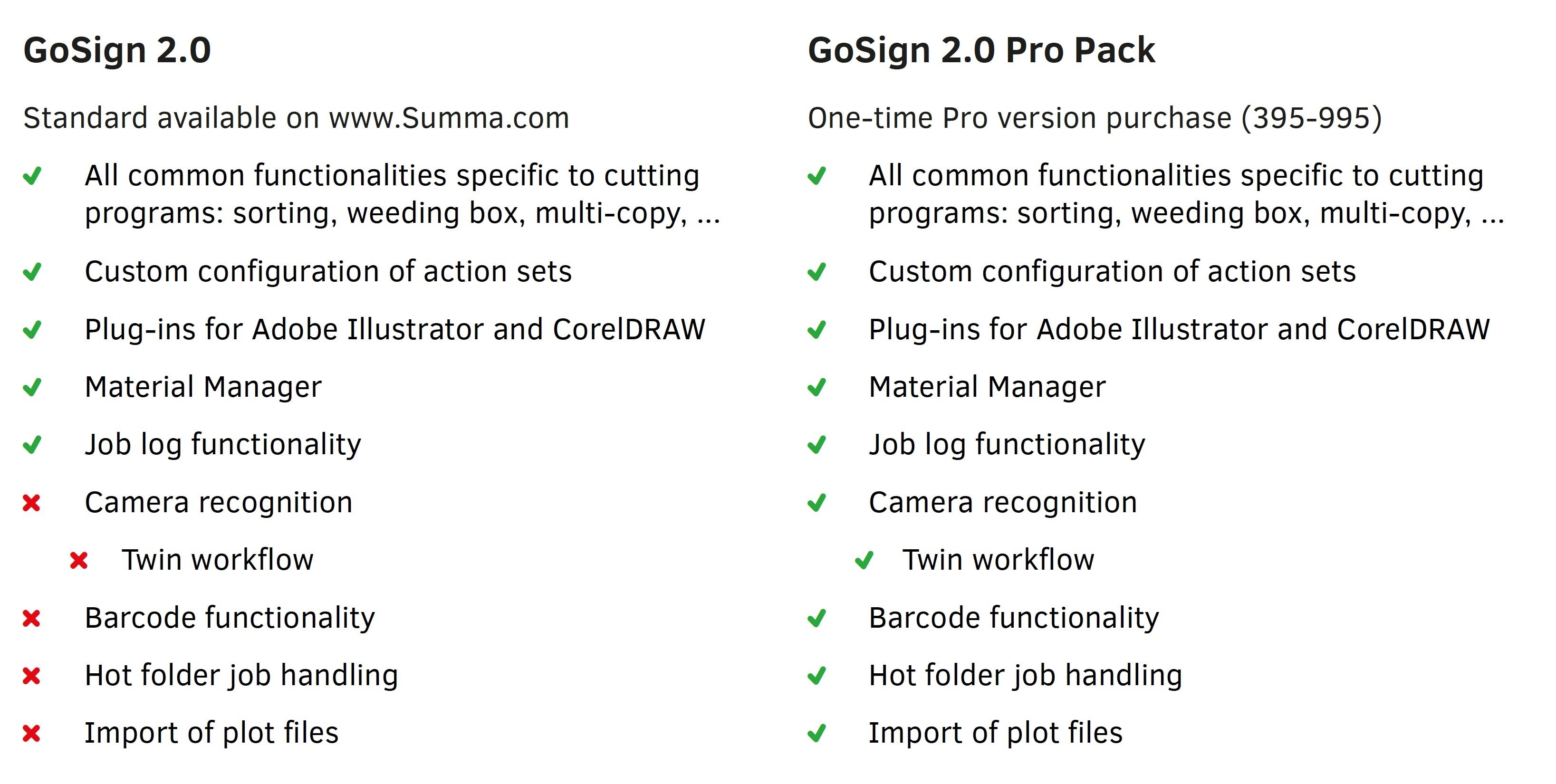
GoSign Pro Pack embeds the before mentioned features and more: Twin Workflow to increase production speed and efficiency by combining a Summa roll cutter and a Summa flatbed cutter in one single workflow. Barcode functionality to ensure plot files can still be modified to optimise cutting requirements. Hot Folder job handling to automatically send cutting files to the Extended import of plot files such as DFX and PLT files, as well as files from free open source programs.
IMPORT OF PLOT FILES:
Import of Plot files GoSign 2.0 can also import plot files, which are files prepared to send directly to our cutting equipment. Normally these files can’t be edited anymore. A small mistake in these files could only be solved by reprocessing the entire job.
HOT FOLDER SYSTEM:
Not only is GoSign able to import jobs by means of file selection, a hand scanner or OPOS Barcode (see further). With the hot folder functionality, files dropped in a folder can now also be opened automatically in GoProduce. The flexible action sets ensure that what happens next is fully customisable.
This hot folder system is specifically useful when the design software is located on another computer in the network. Because in this case, the plug-ins cannot be used.
OPOS CAM & TWIN SUPPORT:
With GoSign a Summa S Class 2 roll cutter with OPOS CAM can be controlled in the same way as an F Series flatbed cutter.
The advantages of a Twin workflow are multiple:
- Thanks to intelligent camera recognition technology, jobs prepared for the Summa F Series flatbed cutters can be run on the roll cutter OPOS CAM units. By combining the best of both worlds – Kiss-cutting on the S Class OPOS CAM roll cutter and Thru-Cut on the F Series flatbed cutter – significant performance increase can be achieved.
- lso without the F Series, the OPOS CAM unit can now cut contour jobs with registration marks randomly placed around the design. So, no restrictions to the bounding box marks, OPOS typically encounters without the Twin support. –
- The Twin workflow also enables to position the cut lines as good as possible on the print, so you don’t need to change the design’s size: Fixed Size mode.
NOTE: The traditional Camera control functionality is still available for free in Summa Cutter control.
BARCODE FUNCTIONALITY:
In contrast to WinPlot, a Barcode workflow can be set up by means of the GoSign 2.0 Pro Pack. A great advantage of the Barcode workflow is the possibility to modify plot files. This way, knife pressures can be optimized to cut specific substrates, which will reduce the knife wear considerably and enhance the overall cutting quality.
By using GoSign 2.0, the Barcode workflow can now be set up with PDF files (or DXF files). So, it is no longer required to generate specific plot files.
NOTE: All previous barcode functionality is still available for free in Summa Cutter control. The GoSign Barcode integration is an extra functionality, which is only available in the payable GoSign Pro Pack.